Volume too loud or can't adjust it?
Update your C82 Aura first. The latest firmware lets you adjust its default output volume directly in the Avantree Updater App.
Try These 3 Steps
1
Update the C82 Aura firmware
DOWNLOAD LATEST FIRMWARE
Update your C82 Aura to firmware V20.6.0 or later.
Required: V20.6.0 or laterDOWNLOAD LATEST FIRMWARE
2
Lower the C82 Aura's default output volume
After updating, open the Avantree Updater App and adjust the output volume.
Avantree Updater App
Setting → Output Volume
Reference
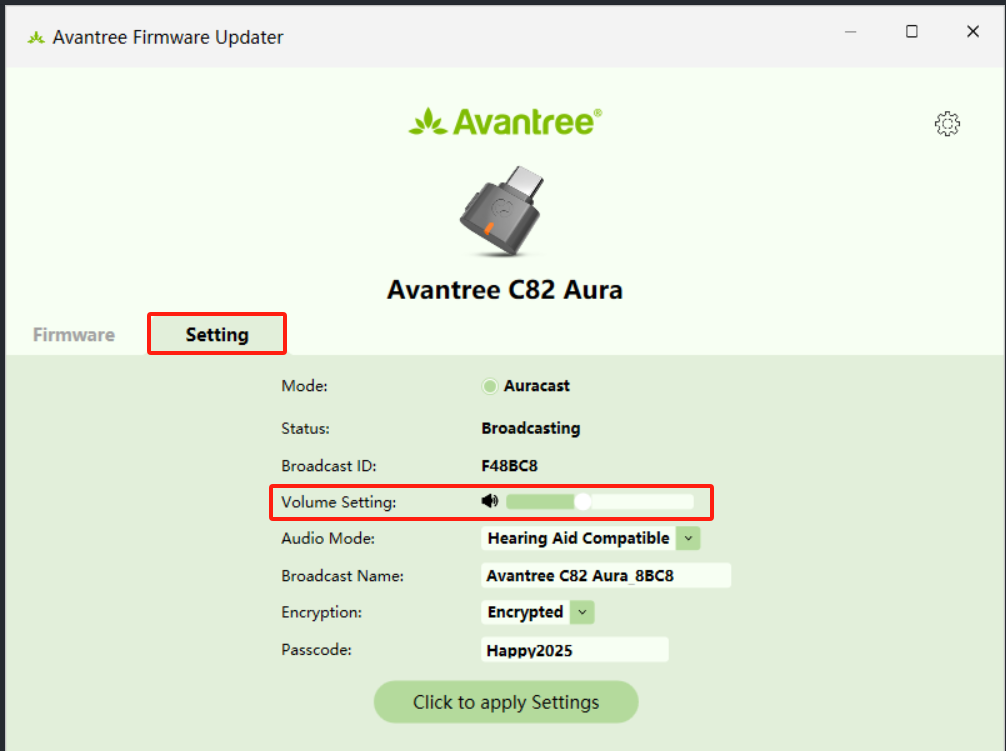
What does this change?
This controls the overall volume sent from the C82 Aura to your hearing aids, earbuds, or headphones.
3
Check your media player's volume
If the sound is still too loud, lower the volume inside the app you're using.
YouTube
Spotify
VLC
Other media apps
Still too loud?
Lower both the C82 Aura output volume in the Avantree Updater App and the volume inside your media player.
Still need help?
Tell us what device you're using with the C82 Aura and what you're listening through.
ASK A QUESTION
Comments
0 comments
Related articles
Please sign in to leave a comment.