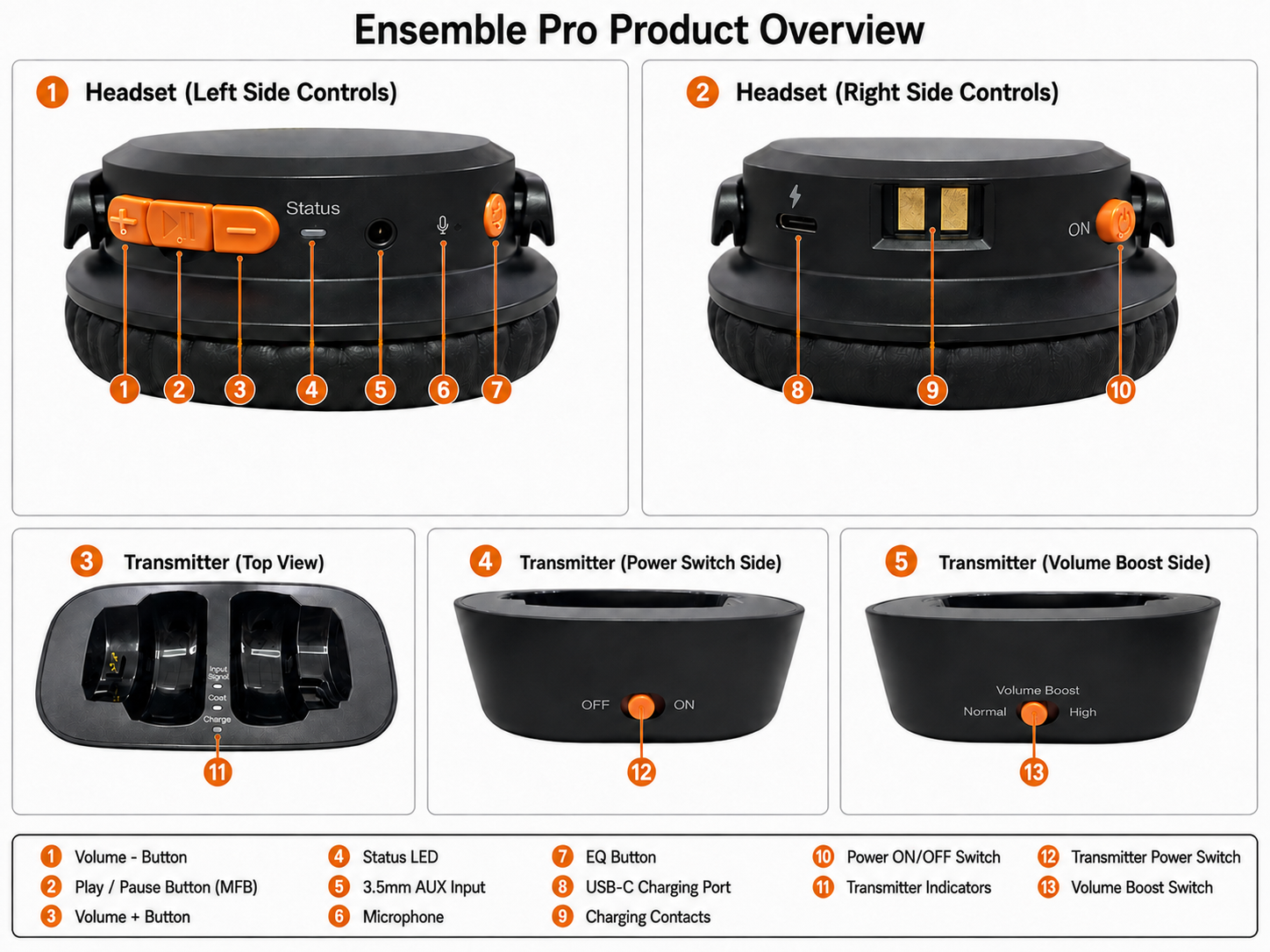
Headphone buttons & indicators:
| No. | Button / Part | Operation | Function |
|---|
| 1 | Volume + Button | Short press | Increase the volume. |
| 2 | Play / Pause Button (MFB) | Short press | Play / pause music in Bluetooth mode. |
| Short press | Answer a phone call. |
| Short press | End a phone call. |
| Press and hold for 3 seconds | Enter Bluetooth pairing mode. |
| Short press | Manually reconnect to the last paired Bluetooth device. |
| Double press | Mute / unmute audio while listening to an Auracast broadcast. |
| 3 | Volume - Button | Short press | Decrease the volume. |
| 1 + 3 | Volume + / - Buttons | Press and hold both for 5 seconds | Clear Bluetooth pairing history. |
| 7 | EQ Button | Short press | Switch EQ modes: Balance, Clear Voice 1, and Clear Voice 2. |
| 10 | Power ON/OFF Switch | Slide to ON / OFF | Turn the headset on or off. |
| LED Status | Description |
|---|
| Blue LED flashing | Bluetooth reconnecting |
| Blue LED solid | Bluetooth connected |
| Orange LED solid | Connected to an Auracast broadcast |
| Red & Blue LEDs flashing alternately | Bluetooth pairing mode |
| Red & Blue LEDs solid for 2 seconds | Pairing history cleared |
| Red LED solid | Charging |
| Red LED off | Fully charged |
Transmitter buttons & indicators:
| No. | Button / Part | Operation | Function |
|---|
| 12 | Transmitter Power Switch | Slide to ON / OFF | Turn the transmitter on or off. |
| 13 | Volume Boost Switch | Slide to Normal / High | Increase the maximum output volume level. Recommended when the TV audio level is too low. |
| 11 | Transmitter Indicators | — | Show power, input signal, casting, and charging status. |
| Indicator | Status | Description |
|---|
| Input Signal LED | Solid white | Audio signal detected. |
| Flashing white | No audio signal detected. |
| Cast LED | Solid orange | Transmitting audio to the headset. |
| Charge LED | Solid red | Charging the headset on the dock. |
| Off | Headset is fully charged. |
Comments
0 comments
Related articles
Please sign in to leave a comment.